
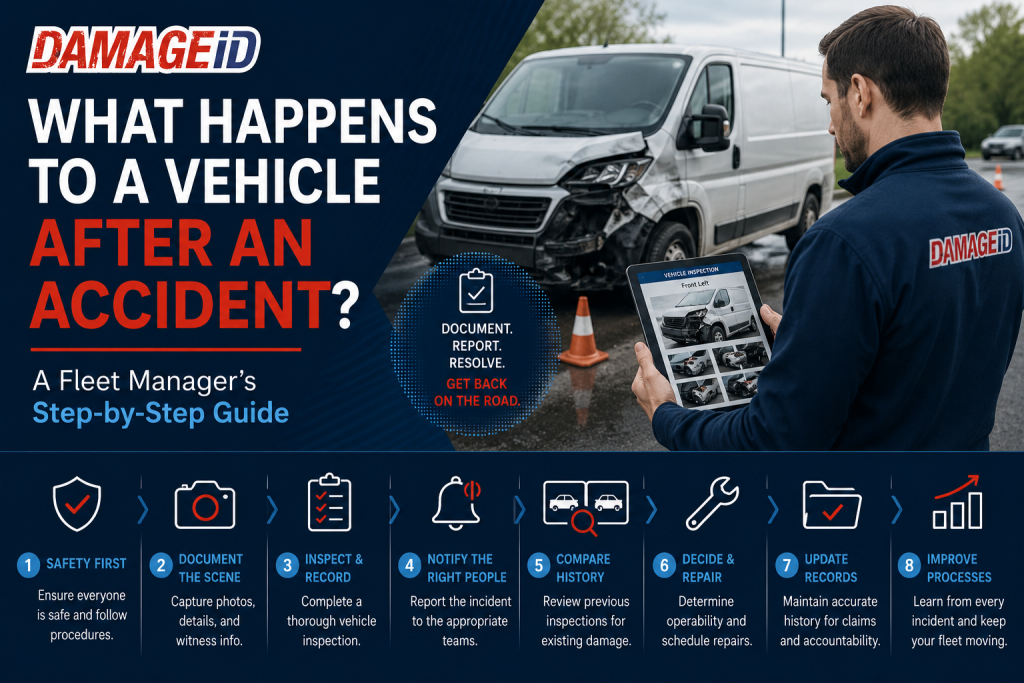
Accidents are an unavoidable part of managing a fleet.
Whether it’s a rental car involved in a parking lot collision, an Amazon DSP delivery van with a damaged mirror, or a service vehicle involved in a rear-end accident, what happens in the minutes and hours afterward can have a major impact on costs, downtime, insurance claims, and customer satisfaction.
Many fleet managers already have procedures in place, but not every process is as organized or efficient as it could be. A delayed inspection, missing documentation, or incomplete accident report can create problems that linger long after the vehicle is repaired.
At DAMAGE iD, we’ve spoken with fleet operators, rental companies, logistics providers, and delivery businesses that all share the same goal: get vehicles back on the road quickly while ensuring every incident is documented accurately.
Here’s a step-by-step look at what should happen after a vehicle accident.
Step 1: Make Sure Everyone Is Safe
Before anyone thinks about inspections or paperwork, safety comes first.
If an accident occurs, drivers should:
- Check for injuries.
- Move to a safe location if possible.
- Contact emergency services if necessary.
- Follow company accident procedures.
Nothing is more important than protecting people.
Step 2: Secure the Scene
Once everyone is safe, it’s time to document the scene before vehicles are moved whenever it’s safe and legal to do so.
Important information includes:
- Photos of all vehicles involved
- License plates
- Road conditions
- Traffic signs
- Skid marks
- Nearby landmarks
- Weather conditions
- Witness information
The more information collected immediately, the easier the investigation becomes later.
Step 3: Complete an Initial Vehicle Inspection
Many businesses make the mistake of only photographing the obvious damage.
Instead, perform a complete inspection.
Even if the accident appears minor, document:
- Front bumper
- Rear bumper
- Driver side
- Passenger side
- Wheels
- Mirrors
- Windshield
- Roof if accessible
- Interior if affected
Damage isn’t always limited to the impact area.
Step 4: Record Everything Immediately
Time matters.
Waiting until the end of the shift or the next morning increases the chances that details will be forgotten.
A proper accident record should include:
- Driver name
- Vehicle number
- Date and time
- GPS location if available
- Photos
- Description of the incident
- Police report number if applicable
The more complete the documentation, the fewer questions arise later.
Step 5: Notify the Right People
Different organizations have different reporting structures, but notifications often include:
- Fleet manager
- Operations manager
- Safety manager
- Insurance provider
- Maintenance department
- Customer (if applicable)
The faster everyone receives accurate information, the sooner next steps can begin.
Step 6: Compare Current Vehicle Condition With Previous Inspections
This is where organized inspection records become extremely valuable.
Instead of asking:
“Was that scratch already there?”
Managers can compare:
- Previous inspection photos
- Time stamps
- Vehicle history
- Existing damage reports
Having historical documentation removes guesswork.
Step 7: Determine Whether the Vehicle Can Continue Operating
Not every accident requires removing a vehicle from service.
Managers typically evaluate:
- Is the damage cosmetic?
- Is it safe to drive?
- Are lights functioning?
- Are mirrors intact?
- Is there suspension or steering damage?
- Are there fluid leaks?
If safety is in question, the vehicle should be taken out of service immediately.
Step 8: Schedule Repairs
Once documentation is complete, repair planning can begin.
Clear inspection records help repair facilities:
- Understand damage sooner
- Order parts earlier
- Prepare estimates faster
- Reduce repair delays
Better documentation often leads to faster turnaround.
Step 9: Update Vehicle History
Every accident becomes part of that vehicle’s story.
Keeping inspection records together creates a complete maintenance and damage history that benefits:
- Future inspections
- Insurance claims
- Vehicle resale
- Internal accountability
The more organized the records, the easier future decisions become.
Step 10: Look for Process Improvements
After every incident, ask:
- Could this accident have been prevented?
- Was documentation complete?
- Did employees know what to do?
- Were inspections performed consistently?
- Did communication happen quickly?
Every accident is an opportunity to improve operations.
High-performing fleets don’t just repair vehicles.
They improve processes.
Where Many Fleet Managers Lose Time
We’ve heard similar stories from fleet managers across multiple industries.
After an accident, managers often spend hours:
- Searching employee phones for photos
- Looking through email chains
- Comparing timestamps
- Calling multiple drivers
- Reviewing handwritten reports
- Trying to piece together what happened
The accident itself may take minutes.
The investigation can consume hours.
How Digital Inspections Improve the Process
Digital inspection platforms help simplify nearly every step after an accident.
Instead of relying on scattered documentation, businesses can create:
- Guided inspections
- Time-stamped photos
- Centralized records
- Organized vehicle histories
- Faster comparisons between inspections
AI-supported inspection tools can also help teams identify potential damage and improve documentation consistency.
The result is a faster, more organized response that allows managers to focus on solving problems instead of searching for information.
Final Thoughts
No fleet can completely eliminate accidents.
What separates high-performing operations is how they respond afterward.
A structured inspection process, complete documentation, and organized vehicle records reduce confusion, speed up claims, improve accountability, and help vehicles return to service faster.
Accidents may be unavoidable.
Operational chaos afterward doesn’t have to be.
See It in Action
DAMAGE iD helps fleets document vehicle condition with guided inspections, centralized records, and AI-supported workflows that simplify accident documentation and improve operational efficiency.